
We’ve all had that moment when we stick a note on the fridge with the month’s appointments, only to find it on the floor three days later. A printable monthly planner solves this problem—as long as you choose a template that suits what you actually need to manage: children’s activities, work deadlines, or medical appointments.
Several online tools now let you create a customizable planner in just a few clicks, with no software to install. You can print it as a PDF or edit it in Excel.
Monthly planner in PDF or Excel: the format changes how you use it
A PDF planner is like a fixed sheet of paper. You print it, pin it up, and write on it with a pen. It’s the right format when you want a visual reference in the kitchen, office, or workshop.
Excel and online spreadsheet formats work differently. You can edit cells, add columns, and recalculate totals for hours worked. For a freelancer tracking workdays or a parent coordinating shared custody, a spreadsheet makes it easy to reorganize the month without starting from scratch.
Tools like Canva offer visually appealing templates focused on decoration and layout, while plannings.fr generates practical planners with automatic calculations for weekends and public holidays. Microsoft Excel offers calendar templates that you can edit directly in your browser. You can easily find a suitable template on the Myblog.fr website, which lists free planners you can customize for your needs.
The choice between PDF and spreadsheet comes down to one simple question: if the planner won’t change once it’s printed, a PDF is enough. If you need to edit it several times during the month, a spreadsheet saves you from reprinting it every time something changes.

Public holidays and school vacations: what a good monthly planner should show
Most calendar templates show standard French public holidays. The problem is that public holidays aren’t the same throughout the country. Some regions and overseas territories have specific public holidays that aren’t included in standard calendars for mainland France.
Before printing a planner to organize your month, it’s worth checking that the template covers the right geographical area. Some tools, such as plannings.fr, let you select a school vacation zone (A, B, or C), which is a good indication that the calendar is reliable.
A public holiday doesn’t necessarily mean a day off
In the private sector, only May 1 is a mandatory day off for most employees. Other public holidays depend on collective bargaining agreements or employer decisions. Showing a public holiday in gray on a planner doesn’t mean you won’t be working that day.
For a planner used to organize a team’s or freelancer’s work, it’s best to use an editable template that lets you visually distinguish between public holidays when work is suspended and those when business continues. A personal color code (green for confirmed days off, orange for uncertain ones) is a useful alternative to automatic gray shading.
Spotting long weekends on a monthly planner
Resources published on data.gouv.fr calculate potential long weekends based on which day of the week a public holiday falls on. A well-designed monthly planner helps you see these opportunities: when a Tuesday is a public holiday, taking Monday off creates a four-day weekend.
According to data.gouv.fr, these automatic calculations don’t account for the specific rules in Alsace-Moselle or the French overseas territories. If you live in one of these areas, you’ll need to add the relevant dates manually.
Customizing a monthly planner: the features that make a difference
Many templates let you change the colors or font. That’s cosmetic. The kind of customization that makes a planner useful every day is about the document’s structure.
- Time slots: a planner with one box per day is enough for deadlines. To manage time slots (childcare, classes, appointments), you need a template that separates morning and afternoon, or even includes hourly rows
- Writing space in each box: a minimalist A4 planner leaves very little room for each day. If you need to note several things per day, A3 or a portrait layout with one column per week gives you more space
- A notes or monthly goals section: some planners include a sidebar for listing the month’s priorities, regular shopping items, or important reminders
- Week numbers: useful when coordinating with an employer, school, or government agency that uses week numbers
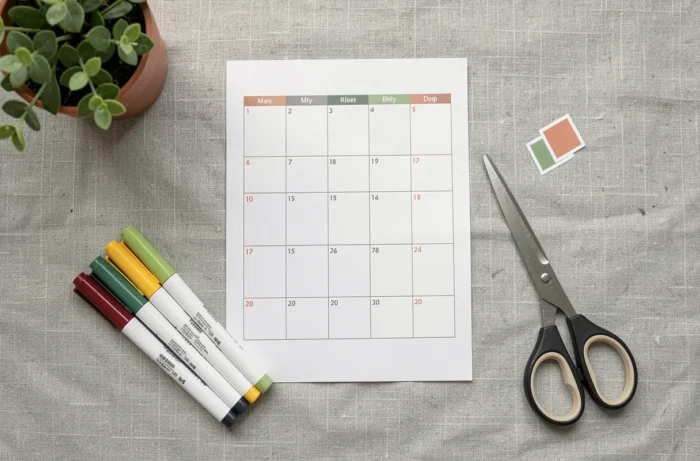
Blank or pre-filled planner: choosing the right template for your needs
A blank planner (with no dates or days of the week) is a reusable grid. You can photocopy it and write in the dates by hand. It’s the most flexible format for uses that change from month to month, such as tracking a one-off project or organizing an event.
A pre-filled planner with the current month’s dates, public holidays, and school vacations saves time when used as a family wall calendar. A pre-filled template helps prevent date-entry mistakes (such as forgetting that a month has 31 days).
For families, a portrait layout with one row per day and several columns (one for each household member) works better than a standard grid. Everyone can see their own commitments without having to read everyone else’s.
For professional use, a landscape layout with weeks in columns makes it easier to visualize workloads and spot overloaded weeks before they arrive.
A printed monthly planner remains a useful complement to digital apps. Its main advantage is simple: when it’s on the wall, you can check it without unlocking a screen. That’s why it’s still so widely used, even by people who already manage an online calendar.